


A Simple Way to Block China and Singapore Traffic Without Touching Google Analytics.

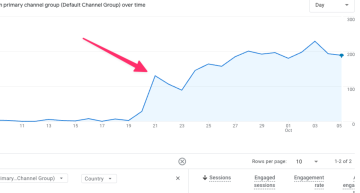
There’s nothing quite like opening Google Analytics and seeing real-time users spike into the hundreds. That rush hit me recently on a site that typically sees maybe 50 to 100 visitors a day. At first, it felt like a win. Then I looked closer.
Several of my WordPress sites running GA4 were suddenly flooded with direct traffic from China and Singapore, and without a clear explanation as to why.
I went down the usual rabbit hole.
Some people said this could be fixed inside Google Analytics. Others pointed to services like Cloudflare.
I even read through Google Analytics Help threads, dug through Reddit, and even tried using AI to make sense of it. None of it really clicked, and honestly, the idea of tweaking filters inside Analytics felt like more guesswork than a solution.
Google has acknowledged unusual traffic coming from China and Singapore and says they’re working on improved spam detection. That’s fine, but I wanted something simple that I could control right now.
So, how did I block traffic from countries?
For me, the easiest next step was handling it at the server level using the `.htaccess` file.
There are plenty of tools that let you block or allow visitors by country. I went with IP2Location, specifically their free visitor blocker tool.
Once you’re there, scroll down and enter the country you want to block. In my case, that was China and Singapore.
Next, I chose IPv4, then selected the Apache 2.0–2.3 `.htaccess` deny option.
Next, Download the file, unzip it, and open the `firewall.txt` file using a simple text editor like Notepad or Sublime.
Once inside that file, look for the line that says `allow from all`. Starting with that line, select and copy everything below it that says `deny from …` all the way to the last entry. This is the block of rules you’ll be adding to your site.
Then, open your site’s `.htaccess` file and paste that block just after `# END WordPress` or before it
If you’re not sure where that file lives or how to edit it safely, your hosting provider can help, or you can follow this straightforward walkthrough.
Once saved, those visits never even reach your site, so they never reach Google Analytics. Clean data again.
As for why this traffic is showing up in the first place, the most reasonable explanation right now is automated traffic tied to AI and large language models scraping content to learn from it or reuse it elsewhere.
Until Google fully sorts out detection on their end, this approach gives you a practical way to stay sane and keep your analytics honest.










Leave a Comment