
How to Convert Emoji Unicode to Punycode for Emoji Domains.

Quick Summary of Contents
Today’s tutorial is likely to be well received after .WS made emoji domains available for the newly released Unicode Emoji v11 earlier this month.
If you were one of the few emoji domain investors to stake claim to a newly released emoji as an emoji domain name, then consider yourself fortunate. 🤩
If you didn’t move quickly enough or didn’t know how to convert Unicode to Punycode, then you’ll want to pay close attention and keep reading. 🧐
You’re likely wondering how did folks register emoji domains using Unicode version 11 Emoji when they’ve not yet been released to devices, right? 🤔
I’ll answer this question by sharing with you two ways to convert Unicode to Punycode. This should allow you to hopefully get and keep a step ahead in the emoji domain game as new Unicode Emoji versions are released.
Convert Emoji Unicode to Punycode using Emojipedia.org.
The easiest way to convert Unicode to Punycode is using the Emojipedia.org website. If you’re not familiar with Emojipedia.org, it’s an emoji search engine that allows fast browsing of every emoji by name, category, or platform.
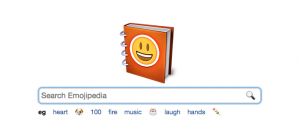
Scroll to the bottom of their website, and a few columns should be displayed.
Find the “Emoji Versions” and “Unicode Versions” columns. These columns give a list of each emoji associated with each version.
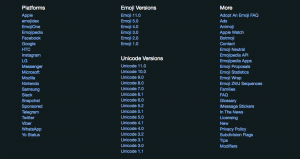
However, to convert Unicode to Punycode of newly released Unicode emoji, we’ll focus on using the “Unicode Versions” column.
At the time of this writing, Unicode 11.0 is the latest version. Go ahead and select the “Unicode 11.0” or the most current Unicode version listed.
Clicking the most current Unicode version link takes you to a page listing the next Unicode Standard version and its scheduled release date.
If visiting this page before the release date, you’ll likely only see the linked emoji name with no emoji displayed, as shown below.
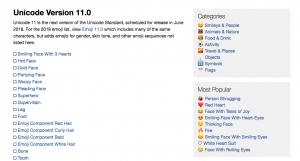
Find the desired emoji name you would like to convert from Unicode to Punycode, and click its link. You’ll then be taken to a page for the selected emoji. I’ve chosen the Smiling Face With 3 Hearts emoji for this tutorial.
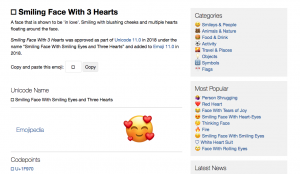
There are two things to note on this page: Codepoints and “Copy and paste this emoji.” The Codepoints (i.e., U+1F970) could be taken and converted to Punycode (more on that in the next section).
The easiest way to convert Unicode to Punycode is simply to click the “Copy” button and paste it into the text input box of Punycoder.com. Remember, the emoji will not show if you’re performing this task prior to the scheduled release date.
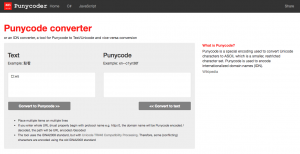
Nevertheless, click the “Convert to Punycode >>” button to convert the emoji into Punycode, as shown below.
Note that I appended “.ws” domain extension to the emoji, but feel free to append an emoji-friendly domain extension of your choice.
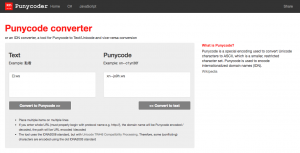
Now, you’re able to view and copy the Punycode result that starts with “xn--“ and then visit any website that allows for emoji domain registrations to hopefully be the first to register desired emoji domains before anyone else.
Convert Emoji Unicode to Punycode using Unicode Code Point.
Using Emojipedia.org is the easiest way to convert emoji Unicode to Punycode. However, allow me to share with you another way Emojipedia.org should go down or not be updated in a timely manner.
What if you only have Unicode code points for the emoji you want to register? 🤔
Don’t fret, whether you were provided Unicode code point(s) or you retrieved code points from the Unicode website (version 11), you can easily convert emoji Unicode to Punycode using xn--domain.net.

This simple tool easily converts emoji Unicode to punycode by simply entering the Unicode code point of the desired emoji domain.
If you remembered in the previous section, we made mention of Emojipedia’s Codepoints section. You can use this section or visit Unicode’s Emoji Recently Added to retrieve code points.
In this example, we’ll continue to use “smiling face with 3 hearts” and its code: 1F970. Take the code point and paste it into the “code points” form field in the “Unicode analysis” section (see below).
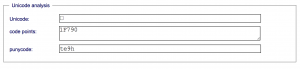
Once entered, the Punycode and Unicode form fields are populated with their respective emoji values. In this case, “te9h” is returned as the punycode for “smiling face with 3 hearts”.
However, to register the Punycode as an emoji domain, you’ll need to prepend “xn--“ to the returned Punycode value and append an emoji-friendly domain extension.
For example, if I desired a .WS emoji domain using the “smiling face with 3 hearts” emoji, then the emoji domain’s Punycode to use when registering at GoDaddy or Website.ws is “xn--te9h.ws”. You could also use .TO or other emoji-friendly domain extensions.
Future Unicode Emoji Releases.
Now that you have two methods to convert emoji Unicode to Punycode, you should be well ahead of the emoji domain registration curve.
Best wishes with staking stake your claim to Unicode’s next batch of emoji when their respective code points become available.
Of course, you’ll only be able to register emoji domains using ccTLDs (for now), and only when and where ccTLD has not blocked or reserved registration of future emoji domains.
Last but not least, for those who do NOT want to read, I encourage you to watch my quick tutorial about converting emoji Unicode to Punycode. 🎥
That’s all for now!
Video Tutorial: Watch and learn how to convert Emoji Unicode and Punycode.